
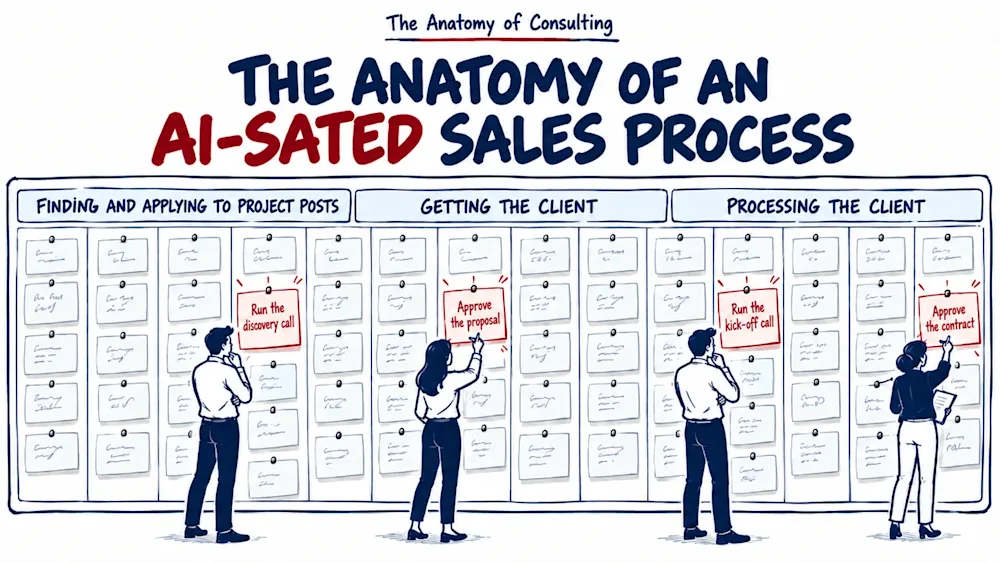
AI-isation in Practice: How We Cut One Sales Process from 105 Manual Activities to 4 Human Touchpoints
Edition 22
I mapped BizzBee's own sales on Upwork like a client's: 113 activities, eight retired by the mapping, 105 kept. Code took 56% of them, code and AI 96%, and a person stayed at four touchpoints: the discovery call, the proposal approval, the kick-off call and the contract approval.
Once mapped, BizzBee's sales on Upwork came to 105 activities, all of them done by hand, from the first job search to the signed contract. After automation and AI, a person is needed at only four of them: the discovery call, the approval of the proposal, the kick-off call and the approval of the contract. Code and AI carry the other 101, which is 96% of the process.
Before it was BizzBee's, that process was mine. I started as a freelancer. At the end of 2014 I took my first client work on oDesk, the marketplace that later became Upwork, and for years I did everything there by hand: I searched for jobs, wrote the applications, answered the clients and closed the contracts. Fast forward, BizzBee still uses Upwork as one sales channel, and after more than 360 jobs it is the process I know best.
So when I wanted to show the AI-isation roadmap on a real case, I did not have to look far. The client was us.
In edition 18 I took apart the AI-isation roadmap for SMEs: four stages in a fixed order, MAP, then AUTOMATE, then AI-SATE, then HUMANIZE, where each stage stands on the one before it and skipping one collapses the next. As a management consultant, I audited our own Upwork channel as if BizzBee had hired me to do it, and counted what moved after each stage.
MAP: ten steps in three groups, all by hand
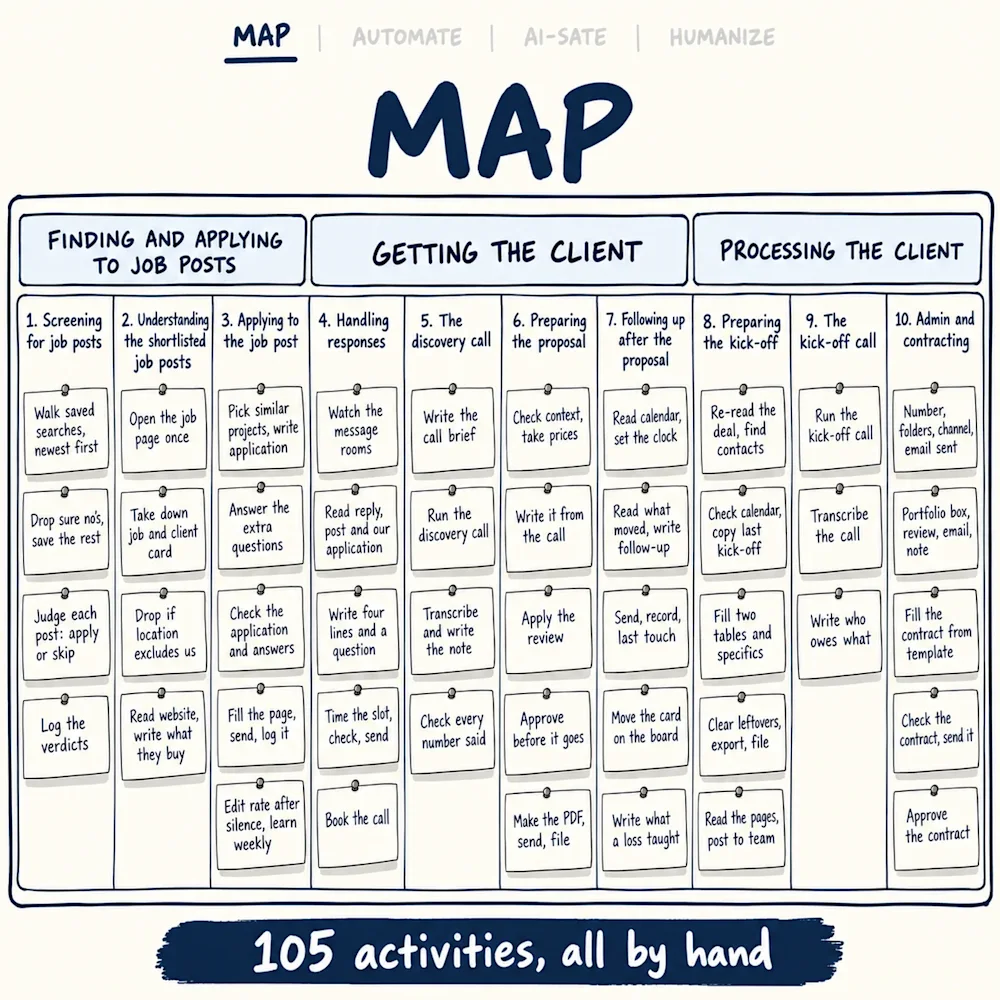
The design question of the first stage is how the work actually flows, and I did not answer it from memory. I first had a few meetings with our sales team. We had an old document on how we run lead generation on Upwork, our playbook, and it had six or seven steps. But I wanted a fresh map, not the old document read back to me. Written down the way the team actually works, it came out at ten steps in three groups.
Finding and applying to job posts
- Step #1 Screening for job posts - every morning the team opens the saved searches and reads the new posts to decide which ones get an application. Upwork calls them job posts, but we apply on fixed-price projects too, so for us they are project posts. Most fall on the first read, on the rate, the country, or a project we already applied to.
- Step #2 Understanding the shortlisted job posts - the team reads each shortlisted post to the end, because the line that rules us out usually sits at the bottom. Then they look at the client, what they spent on Upwork, whom they hired, and their website. It ends on one sentence, what this client buys and what we would sell him, and the decision to apply or not.
- Step #3 Applying to the job post - the team picks two or three projects from our portfolio that are closest to this client and writes the application around them, with one question about their project. If the client added questions for every applicant, the team answers those too.
Getting the client
- Step #4 Handling responses - this step starts only when a prospect answers our application. When we see a response, someone from the team reviews it and responds.
- Step #5 The discovery call - someone from our team meets the prospect on a call. We ask what the project is before we pitch anything, and sometimes the posted project is not ours and the call finds the work that is.
- Step #6 Preparing the proposal - after the call, we prepare a proposal for the prospect with the scope, the timeline and the budget. We take a template that is partly written and finish it with the details for this prospect. Before it goes out, the person who signs for BizzBee approves it.
- Step #7 Following up after the proposal - if the prospect goes quiet, we send a series of follow-ups to remind them and nudge them toward a decision.
Processing the client
- Step #8 Preparing the kick-off - once the prospect says yes, they are a client, and we prepare the kick-off document. It sums up what was discussed, the terms and the proposal, so we can get ready for the kick-off call.
- Step #9 The kick-off call - the client meets the team that will do the work, and together they settle the details.
- Step #10 Admin and contracting - we give the client a number, add them to our portfolio, update our other folders and prepare the contract, so the work can start.
Broken into what they really contain, the ten steps came out at 113 activities, and from here on I count activities, not hours, so a row in the tracker counts the same as a discovery call.
The fresh map paid off before a single line of code was written. The search page already shows the whole job post, so we can read the full list at once instead of opening every job one by one. We stopped paying extra to push our applications up the list. Eight of the 113 activities died on the table this way, and 105 is what we kept. The map also showed two things we had wrong: the saved searches were not sorted newest first, and many new clients every year never got a kick-off document.
AUTOMATE: what rules do before any AI
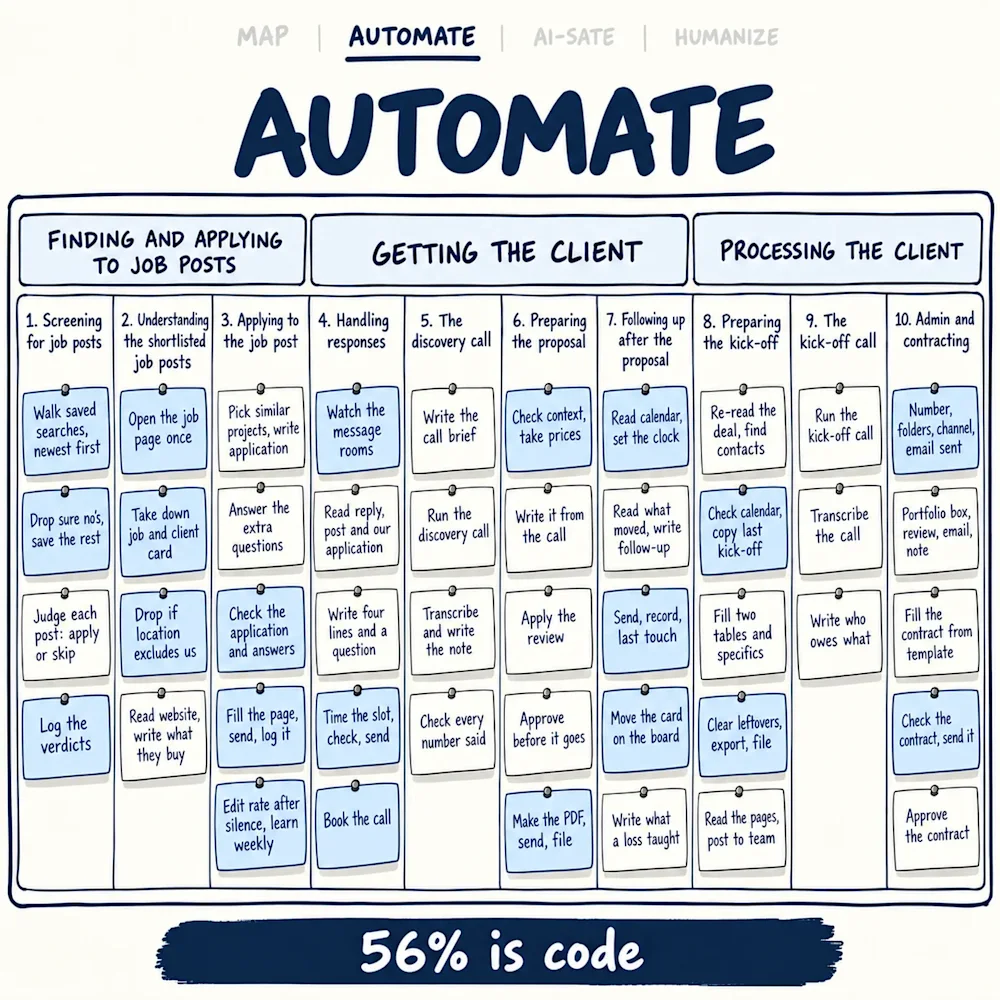
The design question of the second stage is which repetitive, rule-based steps rules can take over. With the map on the table, I put that question to every step: what here goes the same way every time?
Finding and applying to job posts
- Step 1 (Screening for job posts): code walks every saved search newest first, drops the sure no's by rule and saves the full text of the rest.
- Step 2 (Understanding the shortlisted job posts): code opens each surviving job page once, saves the job and the client card, and drops the post if the location line excludes us.
- Step 3 (Applying to the job post): code checks every application for the founding year and the banned words, skips a job whose answer boxes do not match the answers on file, fills the apply page, sends and logs it.
Getting the client
- Step 4 (Handling responses): code watches the message rooms, works out the call slot in the prospect's time zone, sends the reply once it is written and books the call.
- Step 5 (The discovery call): nothing to automate here, this is the call.
- Step 6 (Preparing the proposal): code checks the context before a word is written, takes every price from our offer card, and after the approval sends and files the proposal.
- Step 7 (Following up after the proposal): code reads the calendar first, so a booked call is never chased, keeps the clock on every quiet proposal and sends the follow-up.
Processing the client
- Step 8 (Preparing the kick-off): code copies the last kick-off, clears every trace of the previous client and exports the PDF.
- Step 9 (The kick-off call): nothing to automate here either, this is the call.
- Step 10 (Admin and contracting): code issues the client number, writes the database row, opens the folders and the shared channel, and checks the filled contract against our template, where only the company, the name and the amounts may change.
Everything a model reads later is plain text on disk, which is why I keep coming back to structured data before AI. Counted on the map, code carries 56% of the 105 activities, with no AI in any of it.
AI-SATE: where a model reads and writes
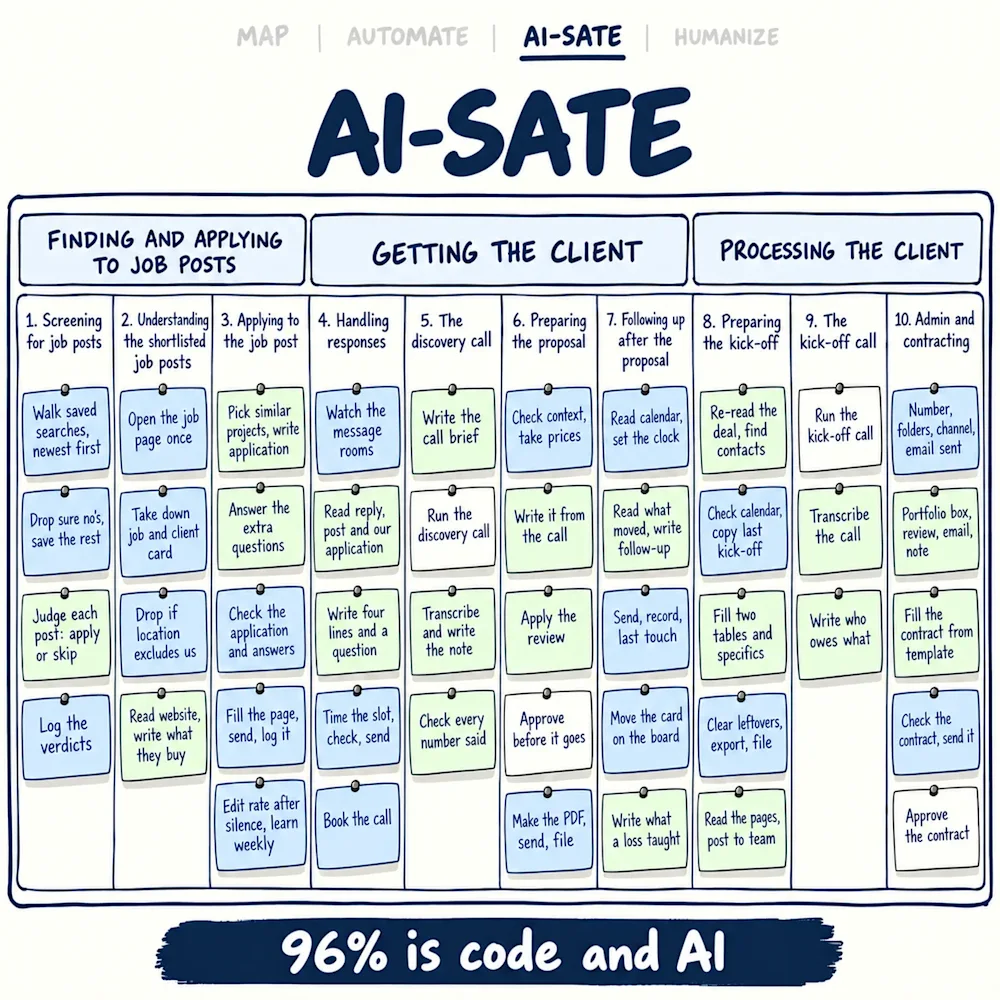
AI-SATE is a made-up word, and I use it because it says what the stage does: the way you automate with automation, you AI-sate with AI. The design question of the third stage is which steps, with the code already on them, need reading, judging or writing that a rule cannot do. Every AI helper reads files from disk and writes files back, the workspace way of working I described in the last edition.
Finding and applying to job posts
- Step 1 (Screening for job posts): AI is the judge. Several AI helpers read the saved posts and write one verdict per post, apply or skip, and a second helper reads every skip again, blind.
- Step 2 (Understanding the shortlisted job posts): AI notes a few facts from the client's website and writes the sentence the team used to write by hand: what this client buys, and what we sell him.
- Step 3 (Applying to the job post): AI picks the projects from our portfolio, writes the application in the name on our profile and answers the client's extra questions, proof first.
Getting the client
- Step 4 (Handling responses): when a prospect answers, that conversation used to be ours. Today AI reads the message, the project post and our application and writes the reply, and code sends it. The conversation that stays ours is the call.
- Step 5 (The discovery call): AI prepares the notes for the call, and after the call writes the transcript and the note and checks every number said.
- Step 6 (Preparing the proposal): AI fills the context from the call, then writes the document and the message that carries the price, and applies the review.
- Step 7 (Following up after the proposal): AI reads what moved since the last touch and writes the follow-up, and for a lead we lose, what the answer taught us.
Processing the client
- Step 8 (Preparing the kick-off): AI re-reads the whole conversation, fills the kick-off document and reads the finished pages.
- Step 9 (The kick-off call): AI writes the transcript and the note.
- Step 10 (Admin and contracting): AI writes the box in our portfolio document, the won review and the email to the client, and fills the contract from our template.
Code and AI together now carry 96% of the map, and what is left sits in four places.
HUMANIZE: four touchpoints left
The design question of the last stage is what work is left after the map, the code and the AI. On the last walk through the ten steps I asked where a person still has to be, and the answer was four places: the discovery call, the approval of the proposal, the kick-off call and the approval of the contract.
Finding and applying to project posts needs no person at all. Automation and AI took it over completely, from screening the posts every morning to sending the application.
Getting the client needs a person in two places. The first is the discovery call: someone from our team runs it and finds out what the prospect really needs. Everything from there, the transcript, the proposal and the follow-ups, is AI and automation. The second touchpoint is the approval of the proposal, because a proposal is a commitment, so it goes out only after the person who signs for BizzBee approves it.
Processing the client has two touchpoints as well. A person runs the kick-off call with the client and the team that will do the work, and a person approves the contract before the client sees it. Everything around them, the kick-off document, the client number, the folders and the filled contract, is prepared by code and AI.
That is 4% of the map. It is small in count, and every commitment the business makes sits in it. That is also why I think the first meeting sells a consultant more than any document does.
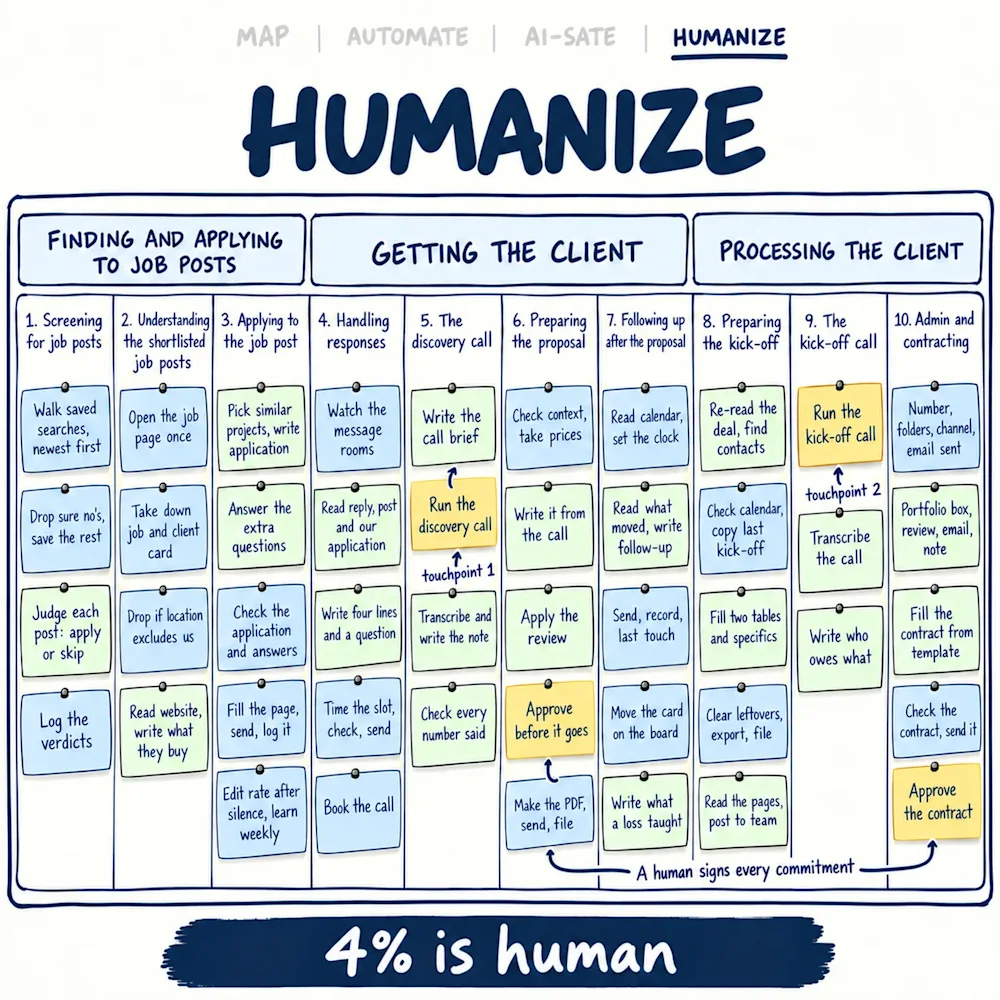
From 100% by hand to four touchpoints
Had BizzBee been a client, my report on this audit would be a verdict, not a binder, and the verdict fits in one line: the map was 100% manual, code took 56% of it, code and AI together 96%, and 4% stayed with people. It only worked in this order. The map paid first, and none of what it found needed AI. The code went in before the AI, so the judge reads saved text instead of paying to open pages. And the human part came last, so I could see what was left instead of guessing it.
If I were selling AI-isation to a client, this is the shape I would sell. I would start with the workflow where the pain is loudest, run the four stages on it in order and count at the end of each one. Only then would I move to the next workflow.
Automate the predictable, AI-sate the scalable, humanize the strategic.
Which of your clients' sales channels would you map first, and how much of it do you think is still done by hand?
If this was useful, follow Anatomy of Consulting on LinkedIn, and the next edition comes to you.
Questions readers ask
What does AI-isation of a sales process look like in practice?
It is the roadmap's stages run on one process in a fixed order: map it, automate the rule-based steps, put AI on the steps that need reading, judging or writing, and keep people where they are needed. On our own sales on Upwork the map found 113 activities in ten steps and three groups; the mapping itself retired eight, and 105 were kept. Code carries 56% of those 105, from reading the saved searches to filing the contract; code and AI together carry 96%, with AI doing everything from judging a project post to writing the proposal; and a person is left at four touchpoints: the discovery call, the proposal approval, the kick-off call and the contract approval.
Why should a consultant map a process by hand before automating it?
Because the map pays before any code does. Our old playbook listed six or seven steps; after a few meetings with the sales team, the fresh map came out at ten, in three groups. Writing the steps down showed that the search page already holds the whole post, so there is no need to open every job one by one, and that the saved searches were not sorted newest first. The mapping retired eight activities before any code was written, among them the paid boost, a maybe pile between apply and skip and a daily cap on applications. None of those findings needed AI.
What is the difference between the AUTOMATE and AI-SATE stages?
AUTOMATE is rules: steps that always go the same way, like dropping a project post from the wrong country, filling a form or writing a row in a tracker. AI-SATE is judgement and writing that a rule cannot do, like deciding whether a project post is worth an application, reading a client's website or writing an application in our name. The order matters: code went in first on our sales, so the AI reads saved text instead of paying to open pages, and no AI price is paid for rule work.
Which steps of a sales process should stay human when you add AI?
On our sales it came down to four touchpoints: the discovery call, where we find out what the prospect really needs; the approval of the proposal before it goes, because a proposal is a commitment; the kick-off call, where the client meets the team that will do the work; and the approval of the contract before the client sees it. Code and AI prepare everything around them, from the transcript of the call to the filled contract checked against the template, but a person leads each one. Every commitment the business makes sits in those four.
How do you measure how much of a process is automated or AI-sated?
Break the process into the actions it really contains and count them, in activities, not in hours. Our sales on Upwork came out at 113 activities in ten steps; the mapping retired eight, and of the 105 kept, code carries 56%, code and AI together 96%, and 4% is human, four touchpoints out of 105. A count in activities says nothing about time saved, since a discovery call counts the same as a tracker row, but it shows the owner exactly which work moved and which stayed.
About the author
Dancho Dimkov writes Anatomy of Consulting, a publication about the practice of business diagnosis. Read more about the publication.
Stages referenced here are links in the diagnostic journey (7 links in total).