
AI Is Easy, If the Data Is Structured
Edition 19
When I talk with other AI consultants, one sentence always gets the same reaction. I say "AI is easy, if the data is structured", and they smile, like people who have been there.
I see the same thing in the field while I write my doctorate on AI and automation in SMEs. Owners like the idea of AI, and they have seen the demos. But from my experience so far, most of them are not ready for it, and the reason is the data.
In the last edition I took apart the AI-isation roadmap: map, automate, AI-sate, humanize. This one is about the floor under it. Before you automate anything or put AI on anything, somebody has to find the data, put it in one place and structure it so a machine can read it. In an SME, that somebody is usually the consultant.
One honest note before I go on. I am not a data scientist, and a data scientist would probably have a better, cleaner and more optimised way to prepare data for AI. I am a management consultant. What follows is what I actually do to get a client's data ready, so that I can run the diagnostic.
What SME data looks like when it arrives
A corporation has people whose job is the data: a finance team that closes the month, someone who owns the CRM. In an SME the data exists, but it sits with the founders, with the outside accountant, in a Viber group, in an Excel only one person understands, and sometimes in a notebook. The owner is busy keeping the company alive, and a tidy spreadsheet does not pay salaries.
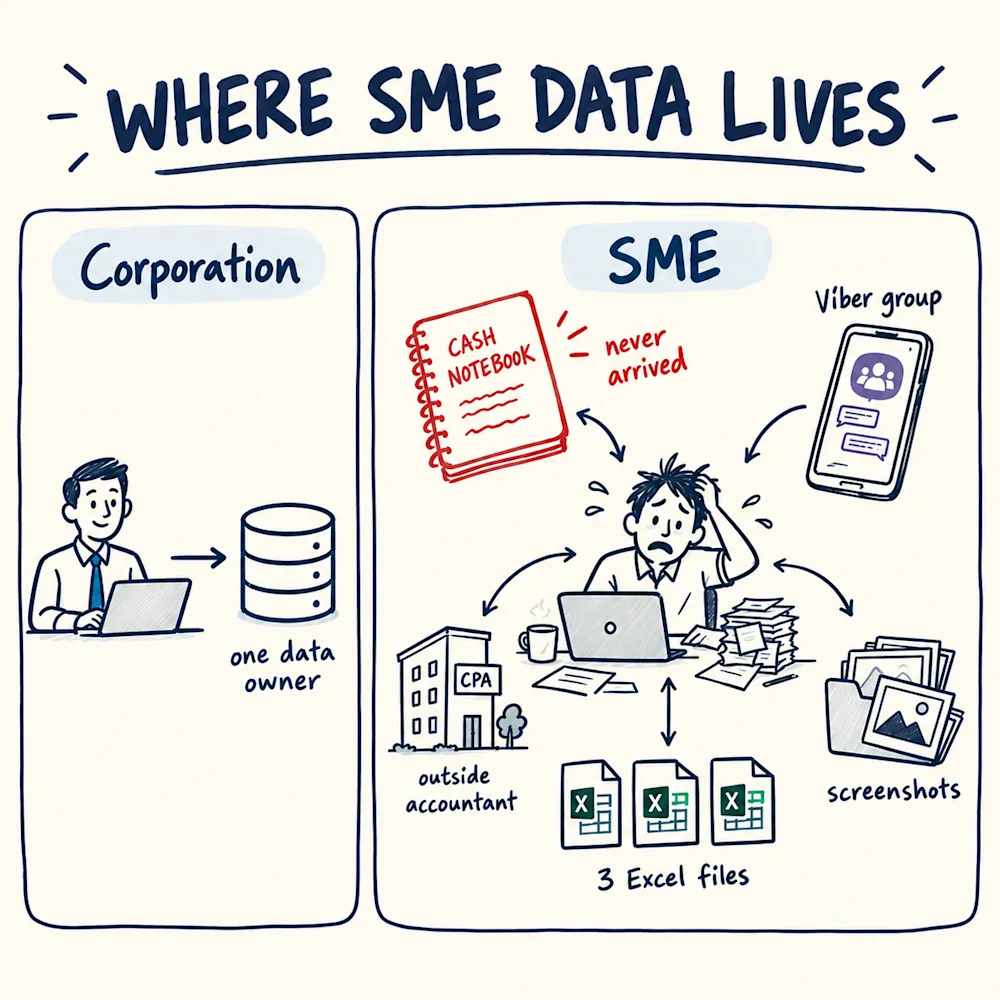
Here is what that looked like on our engagements this year:
- A restaurant's invoices came as 446 Word and PDF files, which our team matched into a register of 178 invoices. Payroll arrived as a screenshot of the accountant's portal. The founders had tried to calculate a monthly result three times, and stopped each time. The cash notebook was requested on 18 May and was still not in on 9 September.
- A digital marketing agency answered our data checklist honestly. Sales by channel: not measured. Costs per product: not really, too time consuming to measure. Budget versus actual: no.
- A window and door manufacturer told us their cost overview "probably won't be 100% accurate". The owner estimated machine capacity at 60%, a number nobody had checked. Monthly revenue came as five scanned pages of an Excel file, and on-time delivery was never tracked at all.
So the first job, on a diagnostic or on an AI project, is collecting the data and making it readable. In my diagnostics that pre-step takes most of the time, and the actual diagnostic starts only after it. When data is simply missing, the absence is often a finding, which I covered in When the Missing Data Is the Finding. This edition is about the data you do get.
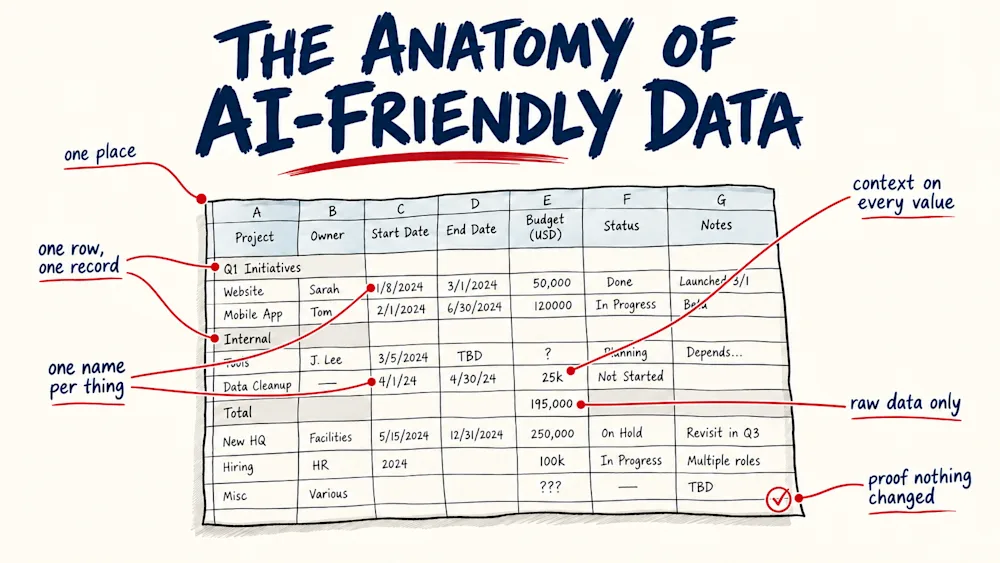
The anatomy of AI-friendly data
Six parts, then what to do with scans and photos, then the instruction we give the AI. Every example is from a real client file, with names and some figures changed.
1. One place
Before you restructure anything, you catalogue. For every engagement we keep a register with one row per document: an ID, the file name, the type, who sent it, the date it arrived, how many pages or tabs, which area of the business it covers, which question of the diagnostic it helps answer, the language, and a first note on what is inside. The instruction at the top of our template: "Log every document as received. Do NOT analyze yet. Catalog first, analyze later."
The second half of the register lists what is missing: what we need, who we asked, when, and where it stands.
On the client's side we keep it light. We ask them to name one official contact person, and we tell them informal material is welcome. In one of our data requests we wrote: "We are not looking for polished documents." Putting it all in one place is the consultant's work.
When you later hand the files to an AI, give it the register as well, so it knows what each file is before it opens it.
2. One row, one record
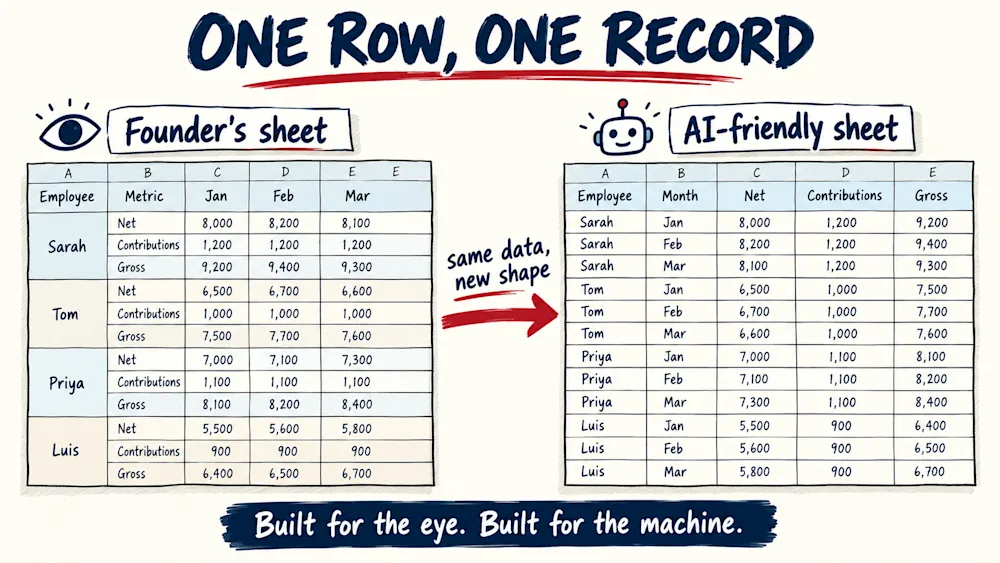
A founder builds an Excel to be read with the eye, not by a machine, and that is fine. When we ran our restructuring instruction on the agency's 2025 workbook, the AI first wrote a plan listing the problems sheet by sheet:
- Employees: a "9-row nested block per employee", net, contributions, gross and six more lines under every name, with the months running across the top.
- Expenses: "12 months as columns" and "5 separate tables stacked vertically", on one sheet.
- Bank: "4 separate tables side-by-side in same sheet".
- Invoices: money in and money out as "2 tables side-by-side".
- Income: a two-row header, the month on top and four columns under every month (amount, currency, conversion rate, amount in denars).
The rule: every row is one thing that happened, and every column is one fact about it. Months become one column instead of twelve. Stacked blocks become rows. Tables that sit side by side become one table, with a column that says which kind of row it is.
The invoices sheet gets the same treatment. Money in and money out sat as two tables side by side, and the month was written only next to the first invoice of each month. In the AI-friendly version they become one ledger, with a column that says which way the money went and the month on every row.
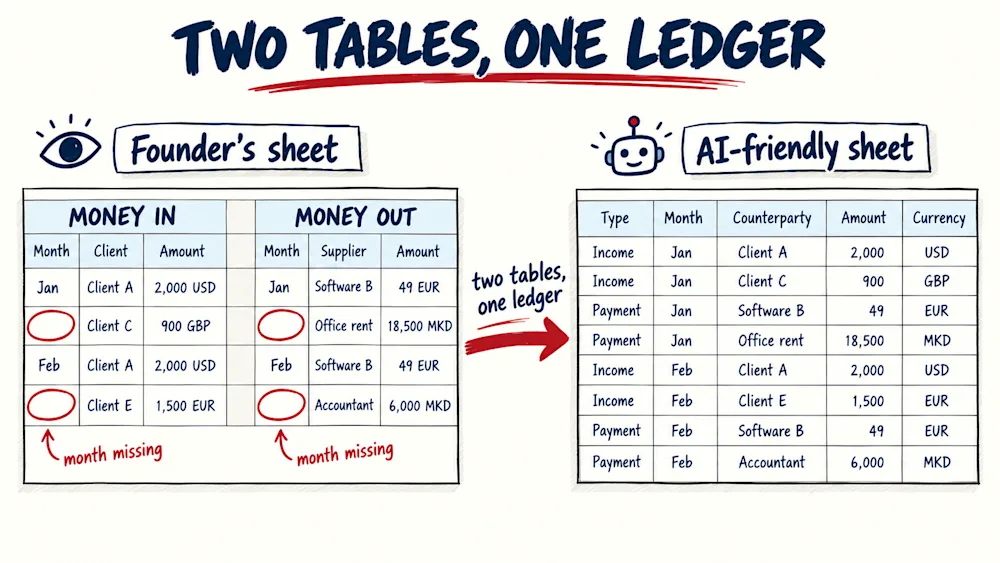
To a person, the AI-friendly versions look worse. The AI's plan estimated about 1,000 rows for the expenses sheet alone once it was unfolded. For a machine, that is what readable means.
3. One name per thing
One 2023 workbook from the agency spells January four ways: "ЈАНУАРИ" on the P&L, "January" on the income sheet, "Јануари" on expenses and "Jan" on invoices.
To a person, obviously the same thing. To a machine that counts categories or compares two years, they are different things, and the total comes out wrong without any warning.
The rule: one spelling for every month, category, client and column, and the same spelling every year. Keep the original label next to the clean name, in its original language. Do not translate it away, because the original is how you find it again in the client's file.
4. Every value carries its context
A number needs who, what, when and which currency, on the same row. The agency's 2023 income sheet had GBP, USD and EUR in one block, and the month lived only in a merged cell above the numbers. Unmerge the cell and the month is gone. On the invoice sheet, the month sat next to the first invoice of the month, and the rows below it were blank. A person reads down and understands. A machine sees an empty cell.
Numbers have to be stored as numbers. "38.227.334,00" is how we write a number in this part of Europe, and a system expecting "38227334.00" reads it as text. "107h 27min" is text too.
And a blank is not a zero. An empty cell means nobody knows, and a zero means nothing happened. The restaurant's till system shows waste as zero on all 1,031 trading days, with no stock count since February 2024. That zero does not mean nothing was wasted. It means nothing was recorded.
It cost us once, in one diagnostic. A software company's financial statement had its 2024 revenue written in the file, but the sheet was read as a dashboard and stored as one block of text. The AI never saw the figure and marked it as a gap.
5. Raw data only
Founder workbooks mix records with totals: a P&L with "total revenue" rows between the line items, summary tabs calculated from other tabs, and in the agency's case a near-duplicate of the expenses tab. Leave totals inside the data, and anything that adds up the rows counts them twice.
The rule: keep the records, drop the totals and summary tabs, and calculate later, from the records. It is the same rule as in Retrieve or Compute: the AI reads and explains, and a calculation does the math.
When the client's own file is wrong, keep their number and flag it. The example our diagnostic process is built on: in the software company's workbook, one month's income formula left out a client, a difference of −25,816.56 MKD. Fix that quietly, and the owner never learns their own report was wrong.
6. Proof that nothing changed
Moving numbers around is where they get lost or doubled. So the original file stays untouched, and the structured copy is checked against it. Count the rows before and after. Compare the totals per group, per month or per client. Find three specific values in both. Make sure the copy holds values, not formulas pointing back at the old sheet. If something does not match, fix it before anyone uses the copy.
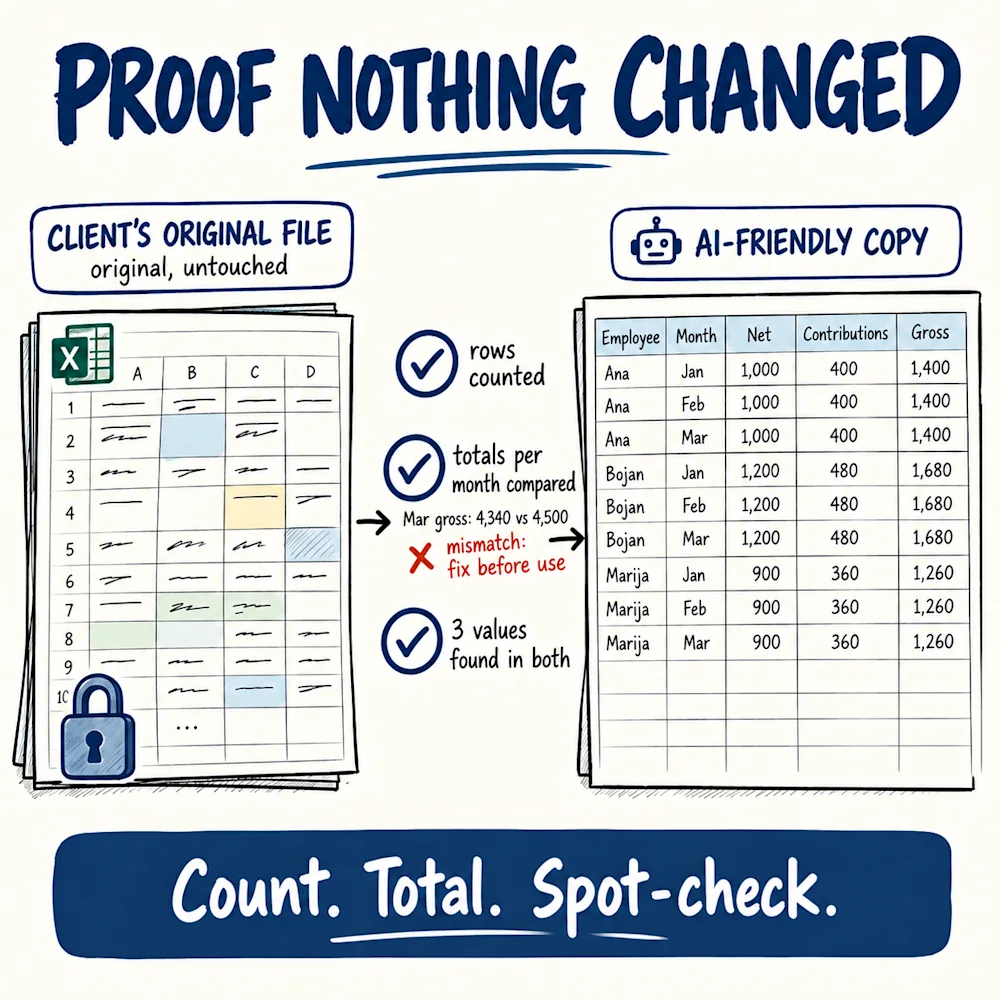
It matters more than it sounds. On the window manufacturer, when we checked our first reading of the revenue tracker against a verified copy, two findings changed: the weakest month was March, not January, and the peak month was July, not November.
Scans, screenshots and photos
Not everything arrives as Excel. The rules are the same, with one step in front: type it up into a table, then check it. The window manufacturer's five scanned pages became a table whose yearly totals match the scans to the cent. Their work instructions arrived as three Viber photos, one with a handwritten note, and were typed up into a document. And the on-time delivery record they never kept can be partly rebuilt from the Viber group, by comparing scheduled dates with the photos the team posts when an installation is done.
A rebuild can also surprise you. Their costs came as 16 separate monthly files. Put together into one table, with the 534 orders listed on their own, it showed about 189K MKD of 2026 loan instalments that their own file had dropped.
Is it worth it?
Every document can be restructured. The question is whether it should be. When I wrote down our method, I put it this way: "of course every document can be restructured. But is it worth it?" So look at the shape of each sheet first. An empty or one-cell sheet, skip it. A clean table, a quick check is enough. A genuinely messy sheet gets the full restructuring. A one-page note or a sales offer does not need to become a table. A three-year expense workbook does.
What to tell the AI
I know, this is a lot of data talk for a consulting newsletter. Unfortunately, it is our reality as consultants: before any diagnosis, somebody has to sit with the client's spreadsheets. The good news is that we now have AI to take the boring part off our hands and AI-sate the data. It is how the data step in our diagnostics went from weeks to hours.
But "clean up this Excel" is not an instruction. Here is an example I can share, a starting point to adapt to your client's files:
I'm preparing this Excel file for AI analysis. Work one sheet at a time.
- First, make a plan. For every sheet: is it AI-readable (yes, partially, no), what exactly is wrong, what you will do, and the priority. Stop and wait for my approval.
- Restructure each sheet into a new tab: one header row, no merged cells, one row per record, months as rows instead of columns, nested blocks flattened into one row, side-by-side or stacked tables separated, totals moved out of the data.
- Keep the original column names in their original language.
- Store numbers as numbers. If a value is text, like "107h 27min", add a column with the number and keep the original.
- Write values, not formulas. Do not calculate or invent anything. A blank stays blank.
- Under each new tab, write one sentence saying what one row means, for example: "an amount, in a currency, invoiced to a client on a date".
- After each sheet, check it: rows before and after, totals per month or per client, and three values found in both. Flag anything that does not match and fix it before the next sheet.
- Never change or delete the original sheets.
Read the plan from step 1 before you approve it. "5 separate tables stacked vertically" on an expenses sheet tells you how the company keeps track of its money before you have analysed a single number.
What this means for us consultants
This is where SME AI projects stall. The client expects a demo, and the first weeks go into chasing an accountant for an export. The client feels the delay, and the consultant absorbs the cost.
So put the step in the proposal as its own stage, with its own time and price: find the data, put it in one place, structure it, check it. I cannot give you a standard number of days, because it depends on how scattered the company is. The restaurant's notebook was still missing sixteen weeks after we asked. Tell the client in the first meeting what you will need and who their contact person is. And if you run diagnostics, that is the natural place to do it once, because the diagnostic and every AI project after it run on the same data.
Gathering the data is most of the work, and it was never the value. The value is what you conclude from it, and what AI and free tools can do with it once it sits in one place. With the data scattered or missing, no tool can help.
Questions readers ask
What is AI-friendly data?
Data an AI can read without guessing: kept in one known place, one row per record, one spelling for every name, every value with its date, entity and currency, raw records without totals mixed in, and checked against the original after restructuring. In most SMEs the data exists but has none of these properties, so it has to be prepared first.
Why do AI projects in small companies stall?
Usually not because of the tool. The data the AI needs sits with the founders, the outside accountant, messaging groups and spreadsheets built to be read by eye. A corporation has people whose job is the data, while an SME owner is running the business. Until someone collects the data and structures it, automation and AI have nothing reliable to work on.
How do I restructure a messy Excel file for AI?
Ask the AI for a plan first, sheet by sheet, and approve it. Then one sheet at a time: one header row, no merged cells, one row per record, months as rows, nested blocks flattened, totals moved out, original column names kept, numbers stored as numbers, values instead of formulas, and nothing calculated or invented. Check row counts, group totals and three values after each sheet, and never touch the original.
Should a consultant charge for data preparation?
Yes, as a named stage in the proposal with its own time and price. There is no standard number of days, because it depends on how scattered the company's data is. When the step hides inside an AI or automation project, the client experiences it as delay and the consultant does it unpaid. A diagnostic is a natural place to do it once, because later projects run on the same data.
How do I know the AI restructured the data correctly?
Keep the original file untouched and test the copy against it: count the rows before and after, compare totals per month or per client, find three specific values in both, and confirm the copy holds values rather than formulas. If the client's own file contains an error, keep their number and flag it instead of fixing it silently.
About the author
Dancho Dimkov writes Anatomy of Consulting, a publication about the practice of business diagnosis. Read more about the publication.
Stages referenced here are links in the diagnostic journey (7 links in total).